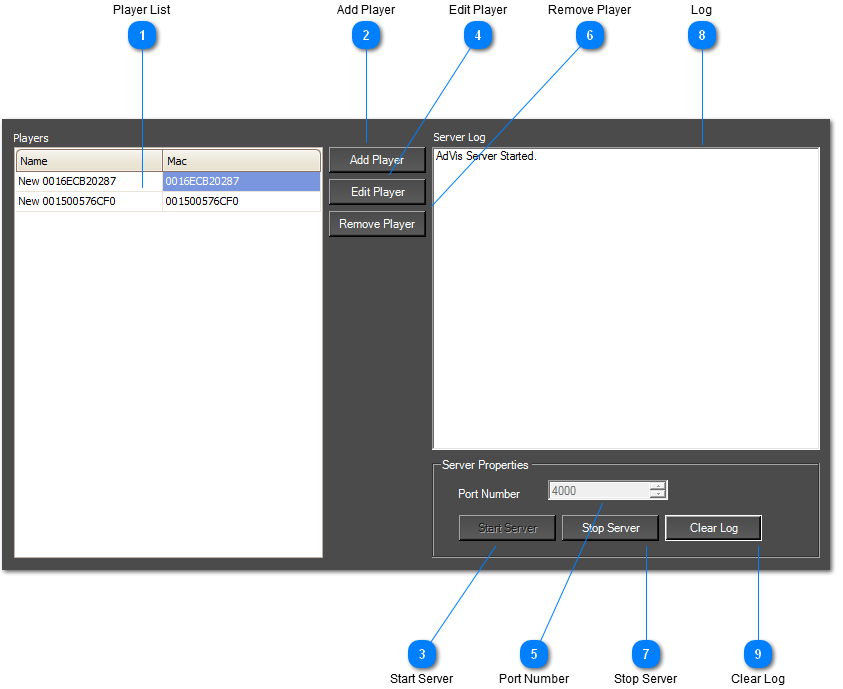
From the master server, you can control a network of AdVis players from one location.
Players are uniquely identified by their MAC address. When a player first connects to the Master Server, it will automatically be added to the player list. You can later edit the player to call it something easier to remember.
When players connect to the master server, they will check all content and download any new files and also replace existing files if they are different or corrupt. You can choose what sequence each player uses from the 'Edit Player' menu.
You will need to make sure that any firewalls don't block the port number and you may need to configure Port Forwarding if your are behind a router.
 Player List
Here is a list of all AdVis Players in your network.
|
|
 Add Player
Add a new AdVis Player.
|
|
 Start Server
The server automatically starts when you open the Master Server.
|
|
 Edit Player
 Settings
|
|
 Port Number
Sets the port number of the Master Server. The network settings in the player must match this.
|
|
 Remove Player
Delete the player from your network.
|
|
 Stop Server
Shuts down the Master Server. Players won't be able to connect until you start the server again.
|
|
 Log
Logs when players have connected and downloaded content.
|
|
 Clear Log
Clears the server log.
|
|