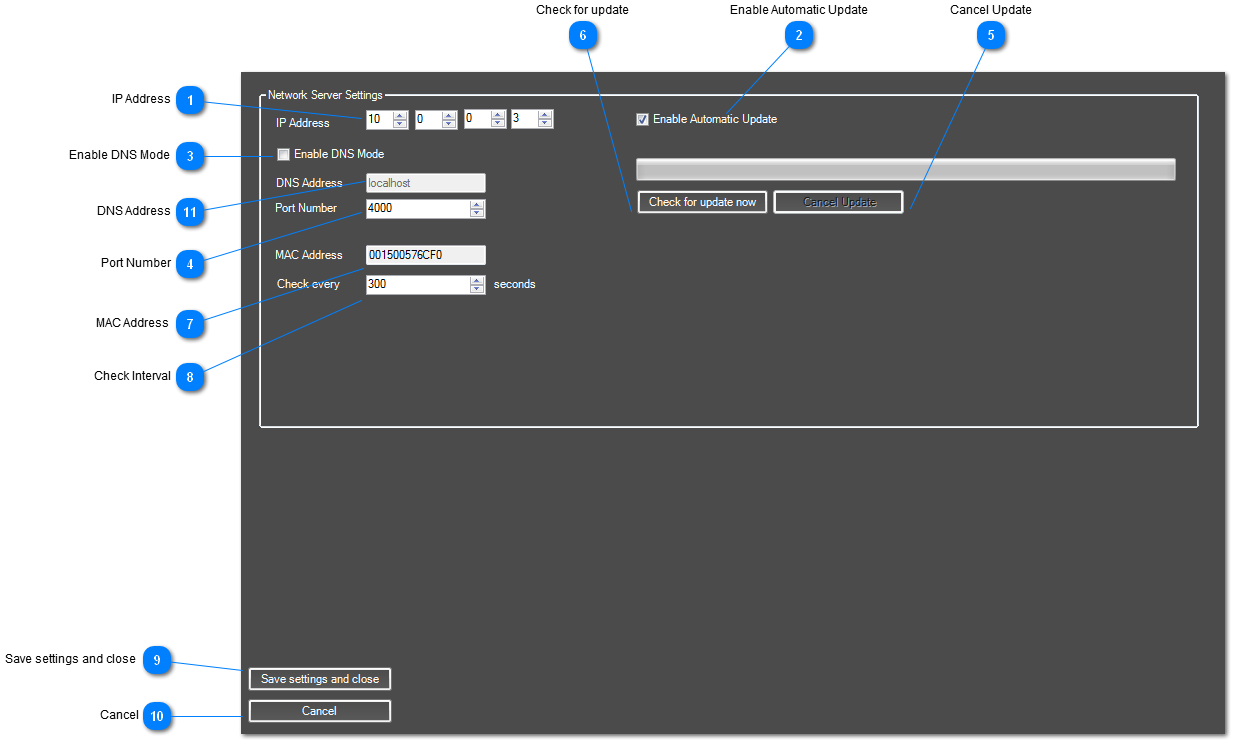
You can setup AdVis to connect to a master server and download new content and schedules.
It's possible to use a demo version of AdVis to design new effects and sequences, then use this PC as the Master server.
Licensed copies of AdVis will be able to connect to this server automatically. You need to enter the settings of the master server here.
 IP Address
Choose the IP address where the AdVis Master Server is located.
|
|
 Enable Automatic Update
If enabled, AdVis will periodically check for new updates and download new content while the sequence is running.
|
|
 Enable DNS Mode
If you are using a DNS instead of an IP address, tick this box.
|
|
 Port Number
Select which port to use for network communication between copies of AdVis.
|
|
 Cancel Update
Cancels the update.
|
|
 Check for update
Connects to the Master PC and downloads new sequence and content specific for this PC.
|
|
 MAC Address
 of the current computer. Used to add players to the master server.
|
|
 Check Interval
Set how often this copy of AdVis will connect to the master copy and check for updates.
|
|
 Save settings and close
When you are happy with all the configuration settings, click here to save the settings and close the configuration dialog.
|
|
 Cancel
Click here to discard changes and close the configuration dialog.
|
|
 DNS Address
<TODO> Insert description text here...
|
|