|
You can add an unlimited amount of images to the Image Viewer effect.
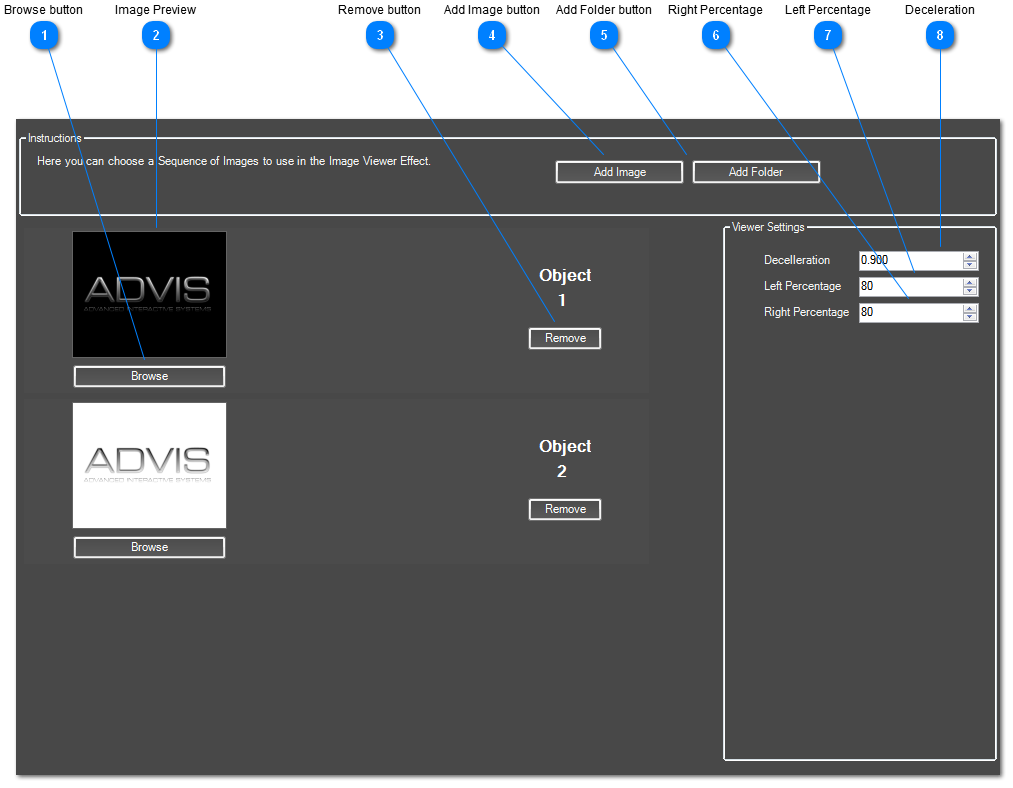
 Browse button
Browse for a new image.
| |
 Image Preview
Preview of the currently loaded image
| |
 Remove button
Remove this image from your effect.
| |
 Add Image button
Add an image to the image viewer effect.
| |
 Add Folder button
Choose a folder to add all the images inside that folder to this effect.
| |
 Right Percentage
This is how much of the right side of the screen is interactive. For example, if set to 50%, the right 25% of the screen will be tracking motion and will move to the next image if motion is detected.
| |
 Left Percentage
This is how much of the left side of the screen is interactive. For example, if set to 50%, the left 25% of the screen will be tracking motion and will move to the previous image if motion is detected.
| |
 Deceleration
This sets how fast images move from one to the next.
| |
|
|